Introduction
Welcome to Scriptora AI — an intelligent LaTeX editor built for academic researchers.
New to Scriptora AI? Start with the Quick Start Guide to get your first paper written and compiled in minutes.
What is Scriptora AI?
Scriptora AI is a browser-based LaTeX editor built specifically for academic researchers, graduate students, and scientists. It combines a professional-grade LaTeX environment with an embedded AI assistant that understands academic writing conventions, LaTeX syntax, and scientific publishing requirements.
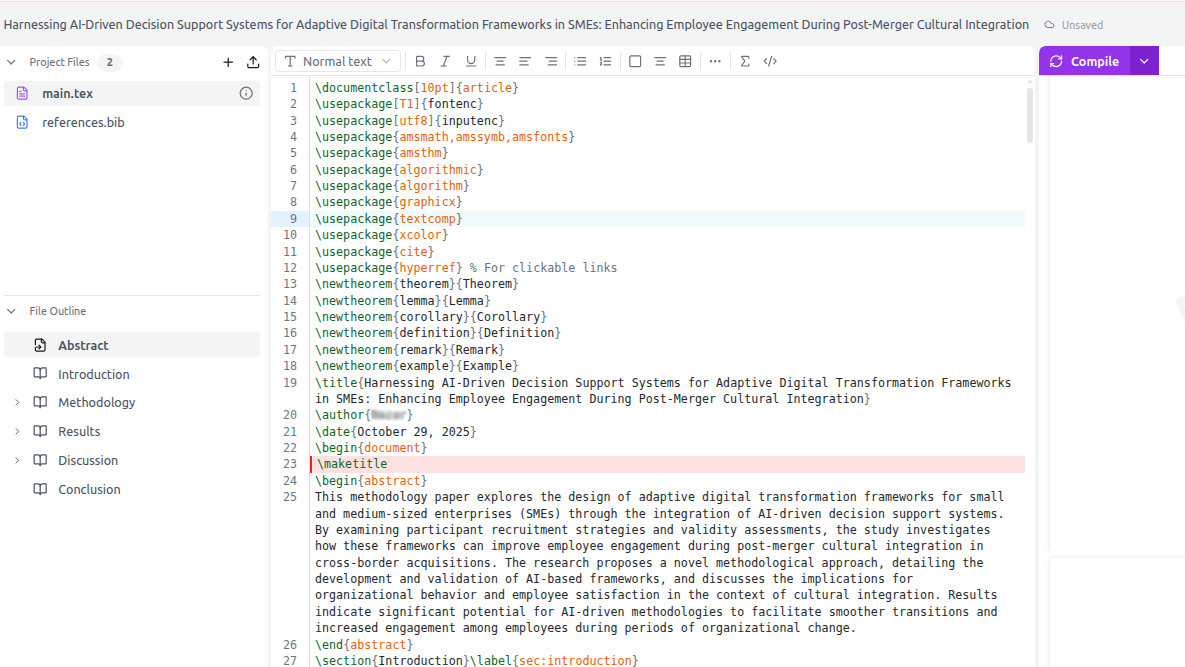
Core capabilities
AI-powered writing
Describe what you need in plain English. The AI drafts sections, improves clarity, fixes grammar, and suggests references — all directly inside your LaTeX file.
Real-time PDF preview
Compile your paper with a single click and see the rendered PDF instantly. Click any line in the PDF to jump to the corresponding LaTeX source.
Python figures
Ask the AI to generate charts and diagrams using Python. matplotlib, seaborn, graphviz, and more — figures are saved to your workspace automatically.
Literature search
Search millions of papers across arXiv, PubMed, Semantic Scholar, CrossRef, and OpenAlex. Add citations to your BibTeX file in one click.
Version control
Save named branches at any point. Roll back to any previous version. Work without fear of losing progress.
Peer review workflow
Import reviewer comments, track your responses, and generate a professional response letter — all in one place.
How it compares
| Feature | Scriptora AI | Overleaf | Word + Copilot |
|---|---|---|---|
| LaTeX editor | ✅ Full CodeMirror 6 | ✅ Full CodeMirror 6 | ❌ Equations only |
| AI writing assistance | ✅ 42 integrated AI tools | ⚠️ Writefull add-on (premium) | ✅ Copilot ($20/mo extra) |
| Python figure generation | ✅ Built-in Docker sandbox | ❌ Not available | ❌ Not available |
| Literature search | ✅ 6 databases built-in | ❌ External tools only | ❌ External tools only |
| Peer review workflow | ✅ Import comments, track responses, generate letters | ⚠️ Track Changes + comments | ⚠️ Track Changes only |
| Real-time collaboration | ✅ WebSocket + Yjs CRDT | ✅ Real-time (free tier: 1 collaborator) | ✅ Real-time |
| Version control | ✅ Named branches + diff viewer | ✅ History (premium: labels) | ✅ Version History |
| arXiv integration | ✅ Import source + export submission | ✅ Submit to arXiv | ❌ Not available |
| AI peer review simulation | ✅ Scores + section feedback | ❌ Not available | ❌ Not available |
| Knowledge base | ✅ Semantic search over your papers | ❌ Not available | ⚠️ Copilot file grounding |
Architecture overview
Scriptora AI is a full-stack application:
- Frontend: Next.js + CodeMirror 6 editor + React
- AI backend: Multiple model providers (Claude by Anthropic, GPT by OpenAI) via the Vercel AI SDK — 42 specialized tools for academic writing
- Python sandbox: Isolated Docker container for safe code execution (matplotlib, seaborn, numpy, pandas, scipy, graphviz, and more)
- Compilation: pdflatex / xelatex / lualatex via latexmk with SyncTeX
- Real-time collaboration: WebSocket + optional Yjs CRDT for conflict-free concurrent editing
- Storage: MongoDB for projects, files, chat history, review cycles, and version branches
All compilation and Python execution happens on the server — your browser only needs an internet connection.